Could Expressed make this workflow fun and fast?
Neil Clayton is iterating a web-based animated island with AI. Useful feedback today is seven copy-paste steps between Mac and iPad. We tried talk-and-draw as LLM input on this post's cover — still no product code — and Grok applied the edit.
Neil is building a web-based animated island. We can easily one-shot something like this in “insert your favourite AI tool/model here” - it’s almost a standard benchmark these days.
But how do you test it, iterate on it, add waves, anyone like seagulls?, what about getting those palm leaves to move just the way you want it? wait, what?! there’s no palm trees!
At that point you are engaging continuous development. Now we’re talking a whole different kettle of fish, jar of sand, bucket and shovel, or at least - and if you want to get all adult about the whole thing - a workflow and feedback mechanism.
The idea
Can this be a good way to provide feedback to an LLM, can I sketch, talk and have it just magically work? Meaning; can I have this feedback become useful and productive when given back to the LLM?
In other words - as Neil once put it so eloquently:
Wow that's terrible - how do I visually provide some decent feedback?
 Neil's island — feedback markup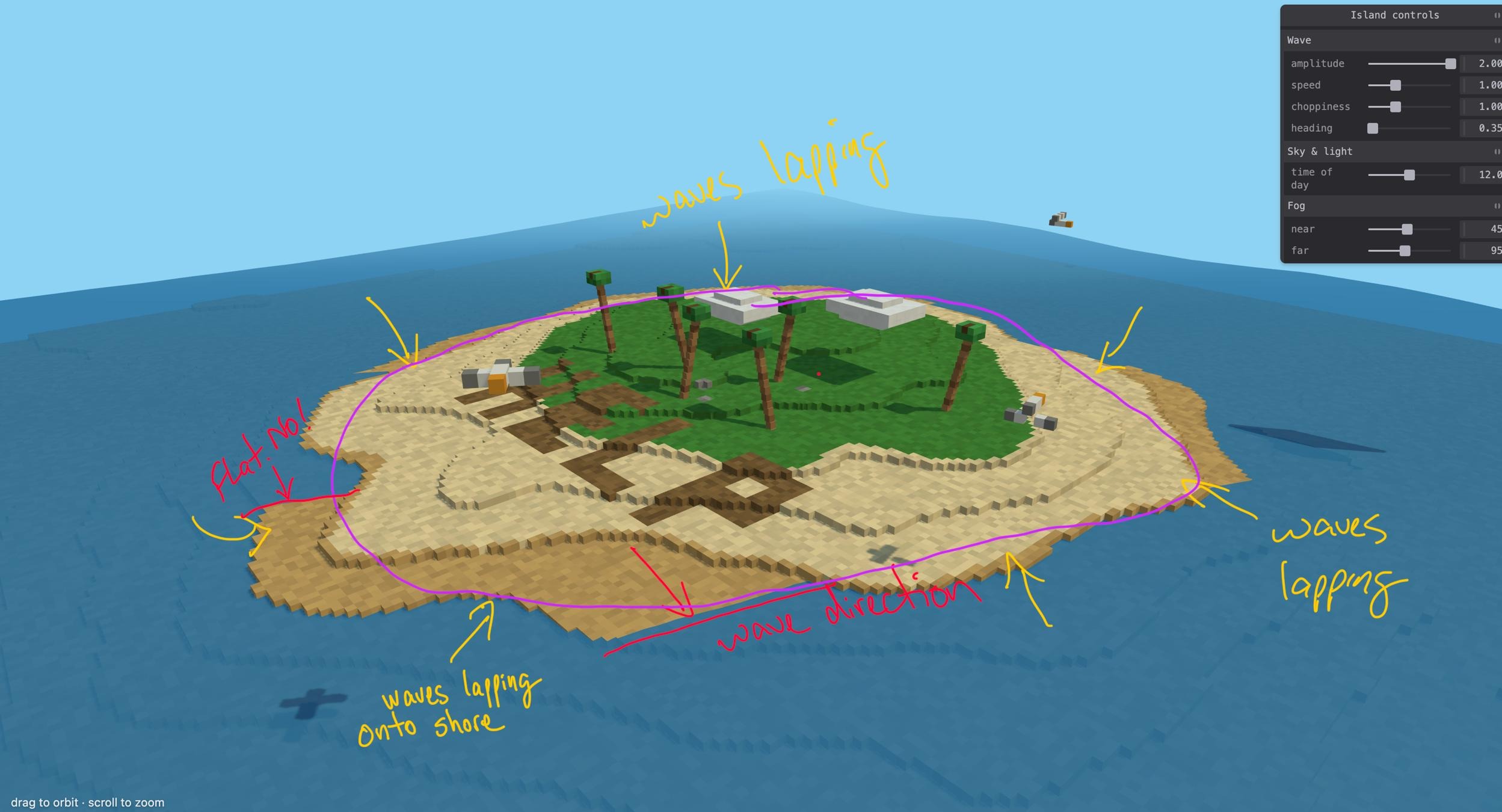
Workflow - now
This is Neil’s dev feedback workflow - real work being done on the Mac, and hey, let’s use this iPad thing:
- capture a screenshot on Mac of the offending material, copy to clipboard (so Continuity can paste it)
- pick up iPad
- load Preview, hit paste (that’s Continuity at its best)
- draw all over the screenshot - providing feedback
- still on the iPad - tap share
- then tap copy the screen
- back on the Mac, paste into the LLM
“Wow John, that’s only 7 steps - I love this, can we also stab ourselves in the feet with spoons at the same time? let’s do it again!”. Said nobody.
Naturally, being rather biased towards Expressed, I’m wondering if there’s a way to help make this easier - reduce the steps, remove the copy/paste stuff. Surely there is a way?
What’s the problem
I think we’re trying to solve this :
* I want to deliver feedback that is visually anchored against a screenshot (or video) of a product to the LLM.
* I suck at drawing with the mouse, wait, *everyone* sucks at drawing with a mouse.
Sure, we could debate this like two seagulls fighting over one chip until the tourists leave; but I’ve got a product question to answer.
Is there a product here?
So could Expressed really help? Most of the pieces are already in place.
I fired up Expressed and we started talking/drawing over a solution; we were thinking the physical workflow might be something like this:
| You | What happens |
|---|---|
| Pick up the iPad | Via magic the tablet works out that you are sharing the desktop already via Expressed, connects to it, and you are ready to draw — this is definitely a leap of faith idea - this functionality does not exist today. |
| Draw, talk, write | Expressed keeps track of sketches and audio — makes screen captures ad hoc, does speech to text on the fly. |
| Put down the iPad | Text is ready on the clipboard, telling an LLM where the movie is, screenshots (along with timestamps and sequencing) and the speech to text of the audio. |
Sketching the feedback workflowThat sounds useful. But is it? Really? Only one way to find out… don’t write a single line of code.
Cool aid
And would be cool if:
- Expressed existed on the Mac, which it doesn’t (sheesh John, get your act together. Ok ok. The platform pieces are in place, I just need to know it’s worth doing — join the Mac waitlist — tell me you need it — and then maybe I’ll write all the platform specific missing bits. Cough cough. I mean I’ll ask AI to write all the platform specific missing bits and just sit here sipping my coffee).
- None of the ideas about bluetooth and proximity are real product. I’ve played with the idea on a branch, could work - not at all production ready and likely requires a real app - ewwww.
- There’s a more important question to answer first … which is …
What’s the real question
Before I even write a single line of code there is a good question that needs an answer:
Would this workflow idea make the feedback mechanism better?
Experimentation time
Here’s what I tried, the original cover art for this very article looks like this - notice anything weird? Yeah me too - the play button circled on the top right is the weirdest UI control I’ve seen in a long time. That’s gotta go.
Feedback to remove the weirdnessTo get this, all I had to do was:
- Load Expressed
- Discuss the change
- Find the resulting movie so I could load it into clipchamp
- Zoom into the segment I was interested in
- Save that
Piece. of. cake. Not. Steps 3+ can be entirely automated in my opinion.
Fair warning; the rest of this post is raw experimentation.
Step 1 - no effort whatsoever
Then I did the unthinkably naive — I just gave it to an LLM to see what would happen.
Result: grok 4.6 tried to embed the video directly into this blog post.
Yeah well, naive - but still worth a shot.
Step 2 - ask Claude
Here’s what I asked of Claude - I was being really vauge on purpose because I don’t know what anyone is drawing on at all.
It used ffmpeg to pull the audio, but went far far further that just a diarization stage
  Transcript (single speaker, one continuous take)

  [02.00 → 09.34]  "This is good, but the area in red contains
                    that play icon, and I want that to be gone."
  [09.34 → 17.64]  "And also this arrow here should actually,
                    in blue, do that."

  No turn-taking — one voice for the whole 21 s, so there's nothing to split. (I did not run pyannote diarization; it
  needs a gated HF model and there are no speaker changes to find.)

  The pen strokes

  I isolated red-ink coverage per frame to get exact draw windows. Everything drawn in the video is red — blue
  coverage only drops (11–13 s), which is the red scribble occluding blue underneath. So the blue circles/arrows are
  baked into the source image, not drawn live.

  ┌─────┬────────────┬───────────────┬───────────────────────────────────────────────────────────────────────────┐
  │  #  │   Draw     │    Stroke     │                             What it lands on                              │
  │     │   window   │               │                                                                           │
  ├─────┼────────────┼───────────────┼───────────────────────────────────────────────────────────────────────────┤
  │ 1   │ 5.17 –     │ Thick red     │ The ▶ play button, top-right of the mock player                           │
  │     │ 8.20 s     │ circle        │                                                                           │
  ├─────┼────────────┼───────────────┼───────────────────────────────────────────────────────────────────────────┤
  │     │ 10.93 –    │ Red zigzag    │ Drawn directly over the existing blue arrow on the right — the one        │
  │ 2   │ 12.93 s    │ scribble      │ sweeping from the right-hand headland circle up-left into the mountain    │
  │     │            │               │ ridge                                                                     │
  ├─────┼────────────┼───────────────┼───────────────────────────────────────────────────────────────────────────┤
  │ 3   │ 17.00 –    │ Red arc       │ Starts under the right headland circle, curves right and down into the    │
  │     │ 17.50 s    │               │ water                                                                     │
  ├─────┼────────────┼───────────────┼───────────────────────────────────────────────────────────────────────────┤
  │ 4   │ 17.90 –    │ Red arrowhead │ Closes stroke 3, pointing left at the small rock in the water             │
  │     │ 18.37 s    │               │                                                                           │
  └─────┴────────────┴───────────────┴───────────────────────────────────────────────────────────────────────────┘

  Speech and ink line up tightly: "the area in red… that play icon" (4.5–7.4 s) runs under stroke 1; "this arrow here"
  (11.1–11.9 s) under stroke 2; and "do that" (15.0 / 17.4 s) is the pause where strokes 3+4 are drawn as the
  demonstration.

  What it means

  Two changes:

  1. Delete the play button. The red circle is a "remove this" mark, not a "look here" mark — "I want that to be
     gone." The big ▶ overlay in the player's top-right corner comes out.
  2. Redirect the right-hand arrow, and keep it blue. Stroke 2 strikes out the existing blue arrow that runs up from
     the headland to the mountain ridge. Strokes 3+4 draw its replacement: from the same headland, curving down into
     the water and pointing back left at the small rock. "in blue" is a colour instruction for the replacement — the
     red is only markup ink; the new arrow ships in the same blue as the rest of the annotations.

  Target file

  The still matches content/en/blog/2026_09_07_neil-clayton/cover.png exactly (it has the EXPRESSED BLOG eyebrow and
  no flourishes around "on video"). The untracked cover1.png in the same folder is a different variant — no eyebrow,
  dashes beside "on video" — so it is not what was reviewed.

  Working frames and the parsed red/blue coverage series are in …\scratchpad\ (key/final_mockup.jpg is the clearest
  single view of all four strokes).
Step 3 - The pieces
So, I’m shortening the blog post - and remember - it’s all a totally manual process to prove whether or not this idea works at all. I did a few more data/metadata extractions:
- Request a speech/audio to text (whisper)
- Analyze the video for hit boxes (where did the pen strokes fall), based on the results of step 1 - to produce a timeline of vector changes and pen/highlighter colour
- Generate hit areas from that (not sure if this is useful)
- Use the text in (1) as a prompt; along with the supporting info from 2 + 3
Here’s task 1 of the larger generated prompt; notice now how the task is explicit about what and where:
### Task 1 — Delete the play button

Remove the circular play-button overlay (a black ring enclosing a solid black triangle) in the
top-right of the mock player, occupying **(1027,136) to (1115,227)**.

- Erase within **x 1015–1128, y 125–238**. That whole window has been verified as blank paper
  apart from the button itself, so you can safely clear all of it.
- Hard limit: do not paint past **x = 1128**. The player's inner black border starts at x ~ 1135
  and must survive intact.
- Leave untouched: the small cloud ending near x ~ 1000, y ~ 195, and the blue arrow below
  at y >= 221.
- Fill with the surrounding cream paper **including its grain** — clone or inpaint from adjacent
  blank paper. A flat colour fill will read as a patch.
- Nothing replaces the button. That corner ends up empty.
It worked!
A picture says a thousand words - the first shot is the last frame of the annotated movie I made…
Before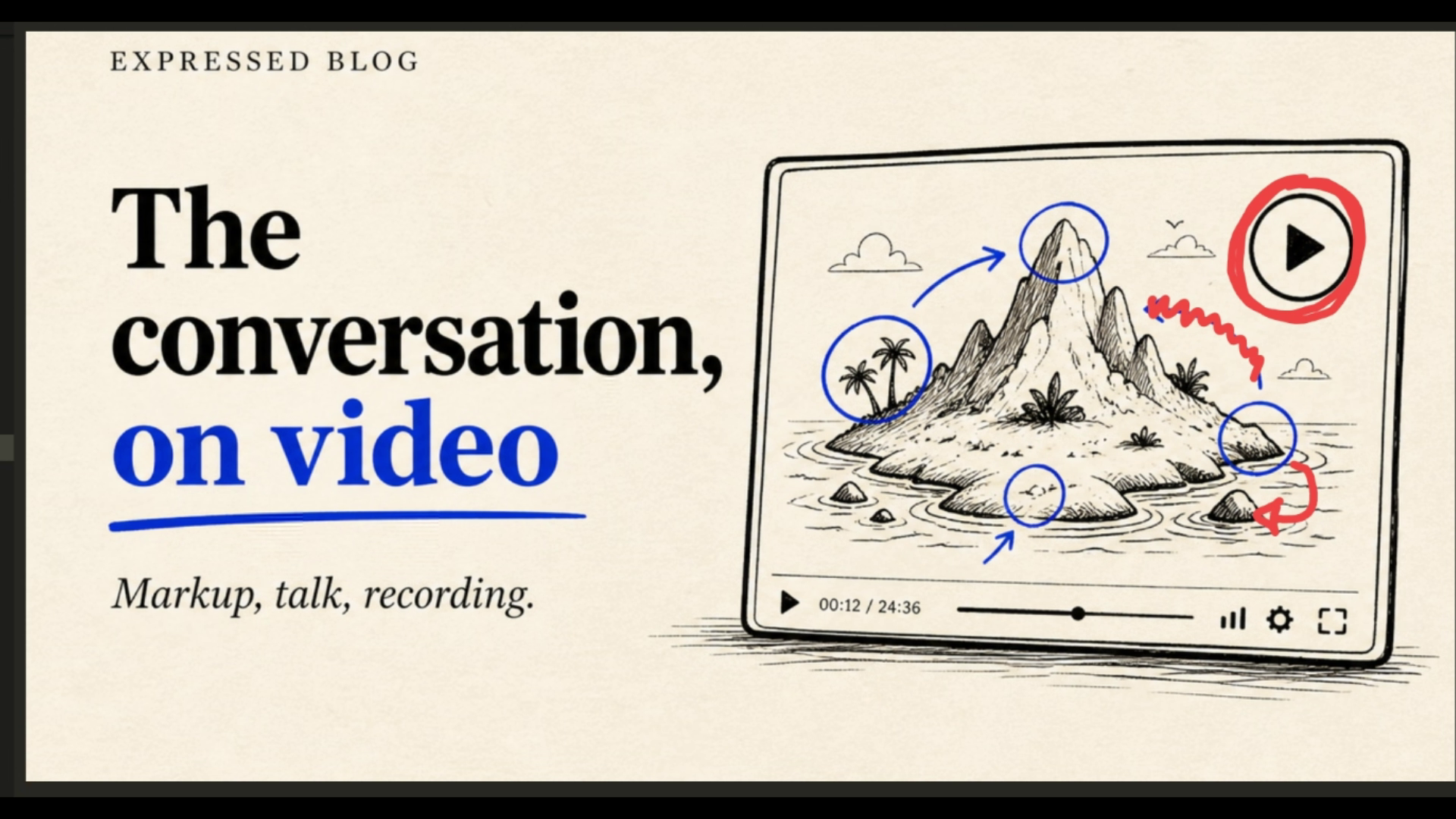 After (via Grok 4.6)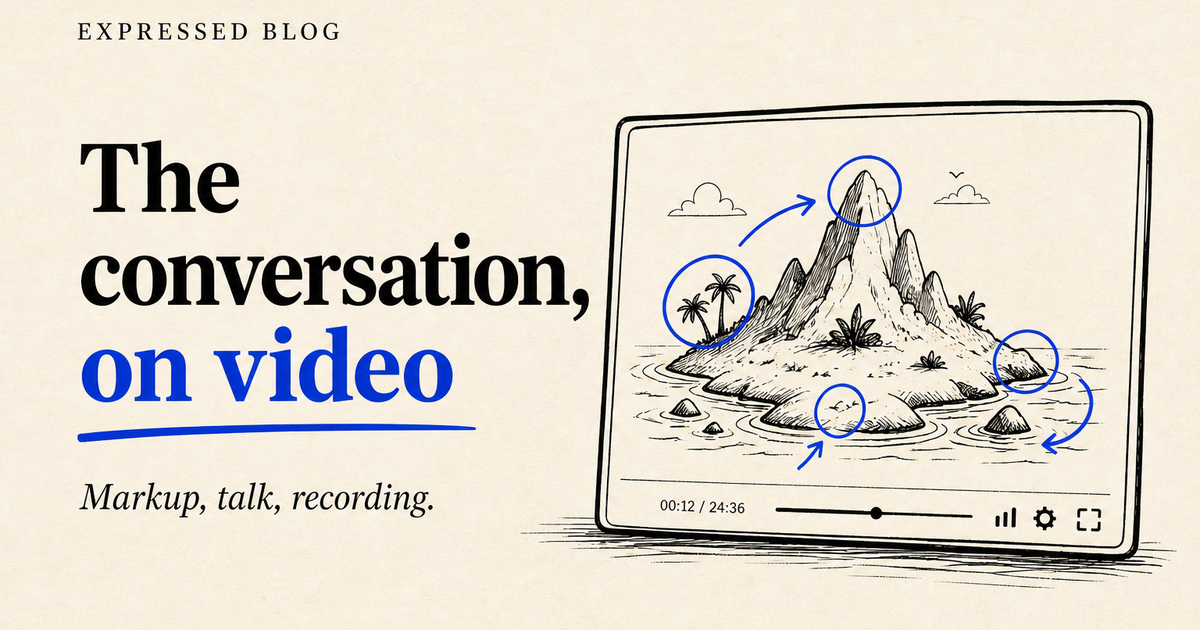
Summary
Well, it worked - I guess I need to refine and try the workflow in many more cases to figure out if this is worth progressing into a product or feature of Expressed.
Known issues:
- All the steps I used to do this were manual, via Claude and Grok 4.6 - powerful frontier models; what can be done using simpler models?
- Whisper for speech to text was great
- I suspect that creating spatially accurate reference points is key - don’t know
Over to you!
Do you already do this? If so - write and let me know - in the meantime I’m gonna play with the idea and see if multiple screenshots and/or audio is a good way to drive development.
– John